


Baby + | Your Baby Tracker
4.7814.00 Reviews
App Specs
- Version
- 3.2
- Updated On
- License
- Free
- Downloads
- 5,000,000+
- Developer
- Philips Electronics UK Limited
- Categories
- Parenting
- Platform
- Android, iOS
Screenshots
 Analysis by AppCompare
When feeding times blur together, I find it helpful to have one reliable place to record what happened rather than trying to reconstruct the day from memory. Baby + | Your Baby Tracker is a parenting app built around that kind of everyday record-keeping, with space for feeding, sleep, changes, growth and milestones. Its strongest idea is not that it can make early parenthood predictable, but that a running log can make small patterns easier to notice. I would treat it as a practical companion, not as a substitute for a clinician or for a parent’s own judgement.
One log for the routines that are hard to remember
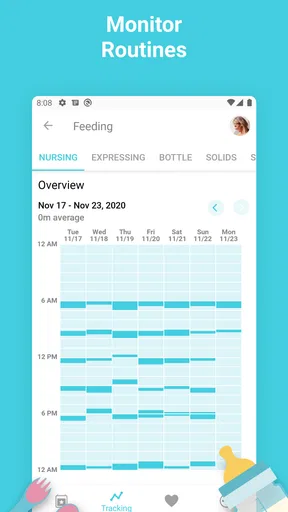
The central appeal is having baby-care notes gathered in one place. In the first months, a question such as “When was the last feed?” can arrive when I am tired, away from my usual routine, or handing care over to someone else. A simple record can answer it more calmly than a guess. The same applies to sleep and diaper changes: individual entries may seem unimportant, but together they can make a day easier to describe and review.
This focus also makes the app distinct from a paper notebook or a general notes app. A notebook can be quick and flexible, while a notes app can be adapted to almost anything; both rely on you to create a structure and keep using it. A dedicated baby tracker gives those recurring tasks a more natural home. The trade-off is that a structured log can feel like one more responsibility if recording every detail becomes a goal in itself.
What I would track—and what I would leave alone
For me, the most useful entries are the ones that answer a real question later. If feeding is the main concern, I would record feeds consistently for a while rather than trying to capture every possible detail. If sleep is what I am trying to understand, I would focus on the start and end of sleep periods, then look for broad rhythms instead of judging one difficult night. This selective approach keeps the log useful without turning care into paperwork.
It is worth remembering that a record is only as helpful as the context around it. A short note can distinguish an unusual day from the usual routine, and a missed entry does not invalidate everything else. I would not try to fill gaps from memory just to make a chart look complete. The purpose is to support a conversation or help me spot a possible pattern, not to produce a perfect account of a baby’s day.
How a shared routine can help in real life
Picture a morning after a broken night: one parent has handled an early feed, another is taking over later, and neither is certain when the last diaper change happened. A tracker can make that handoff less dependent on a hurried text or a half-remembered conversation. The practical benefit is not complicated analysis; it is being able to check a shared record and continue the routine with fewer repeated questions.
That kind of handoff is most useful when more than one person regularly cares for the baby. I would agree in advance on what is worth logging and use the same simple conventions, especially for feeds and sleep. Otherwise, two caregivers may enter information differently or record so much that the log becomes harder to scan. A short, consistent record is usually more useful than an exhaustive one.
Worth Reading Before You Choose

Flipboard Shows What News Apps Must Do Beyond the Feed

Switching to Android Auto Means Rethinking Your Driving Routine

Google Calendar Makes a Crowded Week Easier to Manage

Ludo King Makes the Most of the Minutes Between Plans

Baby Panda World Brings Quick Play to Modern Phones, but Its Game Library Feels Busy

ESPN’s Live Game View Makes Following Close Games Easier
Growth and milestones need a lighter touch
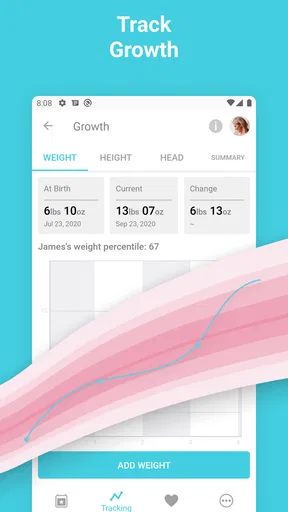
Growth and developmental milestones can make a tracker feel more meaningful than a schedule alone, because the record spans more than a single day. Still, I would use those sections as a personal reference rather than a scorecard. Babies do not follow a perfectly uniform timetable, and seeing an item in an app should not create pressure to meet it by a particular moment. If something is worrying me, I would raise it with a qualified health professional instead of relying on an app entry to settle the question.
The same restraint applies to patterns. A log may help me notice that a routine has shifted, but it cannot explain why. A change in feeding or sleep can have many possible causes, and a record is not a diagnosis. Its value is that I can describe what I have observed more clearly, rather than relying on a vague impression when I want to talk it through with someone who knows my child.
Advice is useful when it stays in its lane
The app also includes development guidance and parenting articles, which can be convenient when a question comes up during an ordinary day. I like having reading material near the tracking tools, but I would approach it as general support rather than a personalised medical answer. Advice about sleep, feeding or teething can help me think of questions to ask; it should not override professional guidance or the needs of a particular baby.
That distinction matters because parents often open an app while tired and looking for certainty. I would use an article to get oriented, then consider whether the situation is routine or needs direct advice. If symptoms seem urgent or a baby is unwell, searching through general information is not the right next step. The tracker is best at organising observations, not deciding what those observations mean medically.
Memories can make the record feel personal
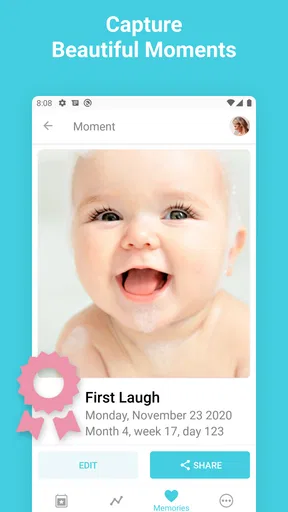
Photos and notes add a warmer purpose to the log. A brief note about a new expression or a first attempt at something can be more meaningful later than another routine entry. I would keep these memories selective: a few details that capture what I want to remember are easier to revisit than a constant stream of notes. That gives the app a keepsake role without making documenting every moment another expectation.
There is a useful balance here. The daily record is for practical recall; photos and personal notes are for looking back. I would not assume that every piece of information belongs in both places, or that an app should be the only home for irreplaceable memories. If I care deeply about keeping a photo or note, I would also maintain whatever separate backup routine I normally trust.
What the app feels like to use
The interface is designed for quick entries, which matters when one hand is occupied or attention is elsewhere. In practice, the biggest test is whether I can record the event without interrupting care or getting pulled into browsing. I would set up the few tracking habits I actually need and make the entry routine brief. If opening the app turns a feed into a longer phone session, it is no longer serving the moment as well as it could.
Baby + is free, and it comes from Philips Electronics UK Limited. It has a 4.6 average from around 98,000 ratings, with over five million installs. Those figures suggest that many families have tried it, though popularity cannot tell me whether its particular approach fits my household. It is rated for Everyone, and version 3.2 requires iOS or Android 8.0 or later. I would check that my device meets that requirement before relying on it as part of a daily routine.
Where it sits among the usual alternatives
Compared with a paper log, the app is better suited to quick searching and keeping recurring records together; paper may still be preferable for someone who wants no screen involved or likes writing by hand. Compared with a general notes app, a dedicated tracker offers a more purpose-built place for baby routines, while notes apps are often easier to customise for an unusual workflow. A spreadsheet can be powerful for a parent who wants to build their own analysis, but it asks for more setup and maintenance.
I would not choose a tracker simply because it has many sections. The better option is the one that makes the information I care about easiest to enter and revisit. If my main need is a shared clinical record or a very specific feeding workflow, I would first check whether the app’s available tools match that need. If I only want to remember a couple of daily details, a simple note or paper card may be less effort.
Who is likely to get the most from it
I think this is most helpful for new parents who want a straightforward history of daily care, especially when sleep deprivation makes time and sequence hard to remember. It may also suit families who share caregiving and want a common reference point, or parents who enjoy keeping milestones and small memories alongside routine notes. The feature set is most valuable when used with a clear purpose rather than as a demand to record everything.
On the other hand, I would skip it if tracking makes me anxious, if I know I will resent regular logging, or if I need a specialised tool that this general-purpose tracker does not provide. Some parents find that recording every feed or sleep period encourages unhelpful comparison; in that case, a lighter approach or no tracker at all may be healthier. There is no prize for maintaining a complete log, and the app should reduce mental load rather than add to it.
For a practical start, I would choose one question I want the record to answer, such as how feeds are spaced or how a handoff between caregivers is going. I would log only the relevant events for a short stretch, review whether the information is genuinely useful, and adjust from there. That trial keeps the habit manageable and shows whether a digital record fits my family better than paper or a general notes app.
My experience with Baby +
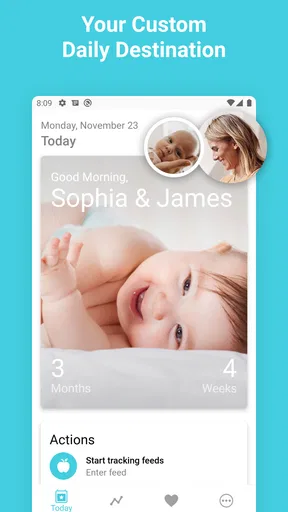
First off, let’s talk about what Baby + brings to the table. It’s essentially a one-stop-shop for tracking your baby’s development, growth, and daily routines. From logging feedings and diaper changes to keeping tabs on sleep patterns, this app does it all. And honestly, having everything in one place is a game-changer when you’re juggling a million things at once.
Daily Tracking Made Easy
The tracking features are super intuitive. You can easily log breastfeeding, bottle feeding, and even solid foods when the time comes. Plus, it’s a breeze to record diaper changes and sleep schedules. One of my favorite features is the ability to see patterns over time. It’s amazing how much you can learn about your baby’s habits just by having this data at your fingertips.
Development Insights and Tips
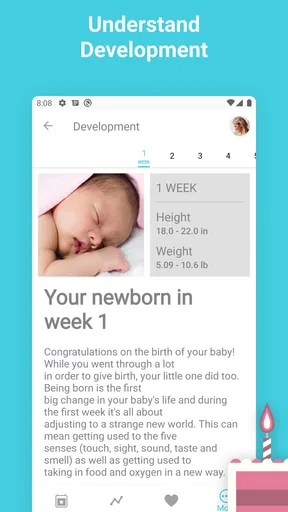
On top of tracking, Baby + offers a wealth of information about your baby’s development. Each day, you’ll receive insights tailored to your baby’s age, which I find incredibly reassuring. It’s like having a little parenting coach cheering you on and providing tips just when you need them.
Personalization and Memories
Another aspect I love is the personalization. You can add photos and notes, creating a digital memory book of your baby’s first year. Honestly, it’s a feature that turns the app from just a tool into a treasured keepsake. It’s fun to look back at how much your baby has grown and changed over time.
Community and Support
Parenting can be isolating, but Baby + makes it a bit less so with its community features. You can connect with other parents, share experiences, and even get advice. Sometimes, just knowing you’re not alone in the chaos can make a world of difference.
There’s also a section with expert advice and articles on various parenting topics. Whether you’re dealing with sleep regression, teething woes, or meal planning, there’s likely a helpful article waiting for you.
User-Friendly Interface
One thing that stood out to me was how user-friendly the app is. Even if you’re juggling a squirmy baby in one arm, you can still manage to log data with just a few taps. The design is clean and intuitive, making it easy to find what you need without any hassle.
In terms of performance, I haven’t encountered any bugs or slowdowns, which is a relief when you’re already dealing with enough unpredictability in life with a baby. The app runs smoothly on both Android and iOS, so you’re covered regardless of your device preference.
Final Thoughts
At the end of the day, Baby + | Your Baby Tracker has become an invaluable part of my parenting toolkit. It’s not just the convenience of having all this information at my fingertips, but also the peace of mind that comes from feeling a bit more organized amidst the chaos. For any new or expecting parent, this app is definitely worth checking out.
If you’re interested in making your parenting journey a bit smoother, you might want to give Baby + a try. Trust me, having a little extra help can go a long way in those early days.
Pros
- User-friendly interface for easy navigation.
- Comprehensive tracking of baby's milestones.
- Customizable notifications for reminders.
- Includes expert advice and tips.
- Syncs across multiple devices seamlessly.
Cons
- Some features require in-app purchases.
- Occasional ads can disrupt usage.
- Limited offline functionality.
- Initial setup can be time-consuming.
- Battery usage can be high.
FAQs for Baby + | Your Baby Tracker
What features does Baby + offer for tracking my baby's development?
Baby + provides a comprehensive suite of features for tracking your baby's growth, including milestones, sleep patterns, feeding schedules, and diaper changes. It also offers a personalized timeline to monitor your baby's development, along with helpful articles and tips tailored to your child's age and needs.
Is Baby + compatible with both Android and iOS devices?
Yes, Baby + is available for download on both Android and iOS platforms. It ensures seamless performance across devices, allowing you to synchronize data and access your baby's information anytime, anywhere, regardless of the operating system you are using.
How user-friendly is the Baby + interface for new parents?
Baby + is designed with new parents in mind, offering an intuitive and easy-to-navigate interface. The app features clear icons and straightforward instructions, making it simple to log and track essential information about your baby’s daily activities and development without any technical hassle.
Does Baby + include any community or support features for parents?
Yes, Baby + includes community features where parents can connect with others to share experiences and advice. It also offers access to expert tips and articles, providing a supportive environment for new parents to seek guidance and reassurance throughout the early stages of parenthood.
Are there any in-app purchases or subscriptions required in Baby +?
Baby + offers a free version with essential features, but it also provides in-app purchases and subscription options for premium features. These may include advanced tracking options, additional content, and an ad-free experience, allowing parents to tailor the app to their specific needs.


